
What is Internet Explorer 7?
Welcome to the Internet Explorer 7 support page. If you're viewing this page, it is an indication that your web browser has recently been updated with the newest version of Internet Explorer. A web browser is a tool used to view internet resources and is essentially the application that displays a website to you. Previously, faculty and staff have been utilizing Internet Explorer version 6.0. We are now developing a process to move slowly over to Internet Explorer 7.0.
The browsers are fundamentally the same with small differences that make for a more enhanced web-browsing experience. This newer version of Internet Explorer also supports many more growing Web 2.0 resources. The user interface of the browser (buttons, menus) will be the most noticeable change, those functional improvements and differences are covered in detail at our training website.
Brief Support Video:
Let's cover some of those fundamental differences...
(Note: You may need to install Flash ActiveX. If you do not see the video after installation, close and re-open your web browser)
(click the play button to begin support video)
Where are my Favorites? |
|
|
Just click on the |
|
|
Where’s my Home button? |
|
|
Go to your homepage with this familiar
|
|
|
Where did the Menus go? |
|
|
If your Menu bar isn't visible, click on the |
|
|
Where are the Refresh and Stop buttons? |
|
|
The
|

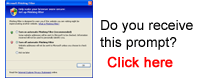
Phishing Prompt: If you receive a prompt inquiring about the IE7 Phishing Filter, you can simply click Turn off automatic Phishing Filter followed by the OK button (as shown below).

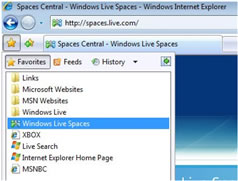
 star icon for a drop down Favorites menu. The new Favorites Center gives you one place to view your favorite websites,
  RSS feeds, and History.
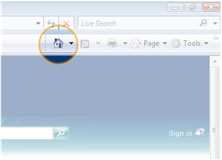
 house icon in a new location.
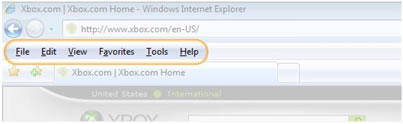
 Tools drop-down arrow near the upper-right-hand corner of the browser and select Menu bar. A check mark next to an item indicates that the menus are turned on.
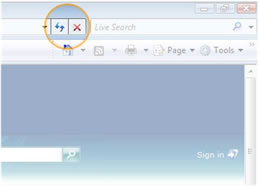
 Refresh and
  Stop buttons are now located at the end of the address bar.